
Social Media Character Counter
Use this free Social Media Character Counter to check the length of captions, posts, titles, biographies and descriptions before publishing. Select a platform, type or paste your copy and see the character count instantly.
The tool also counts words and hashtags and shows how many characters remain. Your text stays on your device and is not stored by Cultures Connect.
Platforms may change their limits. Check the platform before publishing time-sensitive or paid content.
How to Use the Social Media Character Counter
Follow these steps:
- Select the platform and content field.
- Type or paste your social media copy into the text box.
- Review the character, word and hashtag counts.
- Check how many characters remain.
- Edit the copy if it exceeds the selected limit.
- Select Copy text when your draft is ready.
The counter updates automatically as you type. You can also switch between platforms to adapt the same message for different channels.
What Does the Character Counter Measure?
The Social Media Character Counter displays four measurements:
- Total characters
- Remaining characters
- Total words
- Total hashtags
Characters include letters, numbers, spaces, punctuation and emojis. This is different from a word count, which counts groups of text separated by spaces.
The progress bar shows how close your text is to the selected platform limit. If the remaining count becomes negative, shorten the text before publishing.
Social Media Character Limits
The calculator currently checks these limits:
| Platform and field | Character limit |
|---|---|
| Instagram caption | 2,200 |
| Instagram bio | 150 |
| TikTok caption | 4,000 |
| LinkedIn post | 3,000 |
| X standard post | 280 |
| Pinterest title | 100 |
| Pinterest description | 800 |
| YouTube title | 100 |
| YouTube description | 5,000 |
| Facebook post | 63,206 |
Platforms can change their limits or offer different limits depending on the account, format, device or subscription. Check the platform directly before publishing important paid or time-sensitive content.
A character limit is also not a recommended length. A platform may allow thousands of characters, but a shorter version may communicate the message more clearly.
Instagram Caption and Bio Limits
The calculator uses a limit of 2,200 characters for an Instagram caption and 150 characters for a bio.
You do not need to use the entire caption limit. Put the most important message near the beginning because users may need to expand a longer caption.
A useful Instagram caption can include:
- A strong opening line
- The main message
- Supporting information
- A call to action
- Relevant hashtags
For bios, prioritise what you do, who you help and what visitors should do next. Avoid filling the limited space with unnecessary words.
TikTok Caption Limit
The calculator uses a 4,000-character limit for TikTok captions.
Longer captions can provide context or include relevant search phrases, but the video should still communicate the main idea. Do not rely on the caption to explain something viewers need to understand immediately.
Keep the opening clear and include the most relevant words naturally. Avoid adding unrelated keywords only to fill the available space.
LinkedIn Post Limit
LinkedIn currently allows up to 3,000 characters for a standard post. LinkedIn recommends publishing an article when the content needs to exceed the post limit. You can confirm this in LinkedIn’s official posting guidance.
Longer LinkedIn posts can work when they contain a useful story, opinion or lesson. Improve readability with:
- Short paragraphs
- Clear opening lines
- Useful examples
- White space
- A focused conclusion
- One relevant call to action
Do not make a post longer only because the platform allows it.
X Post Limit
The calculator uses the standard 280-character limit for X.
X Premium subscribers may have access to longer posts. X explains that the typical post limit is 280 characters, while longer-post features are available to eligible Premium users. Review X’s official explanation of post types if you plan to publish beyond the standard limit.
For a standard post, focus on one main idea. Remove repeated phrases, unnecessary introductions and words that do not change the meaning.
Pinterest Title and Description Limits
Pinterest allows up to 100 characters for a Pin title and up to 800 characters for a description.
Pinterest notes that only part of the title may appear in some feeds. Put the most important topic near the beginning rather than hiding it at the end.
Descriptions help Pinterest understand the relevance of a Pin, even when the full description is not displayed prominently. Use natural keywords that accurately describe the destination page.
You can confirm these limits through Pinterest’s official Pin specifications.
For Pinterest copy:
- Use a clear and specific title.
- Include the main topic naturally.
- Explain what the user will find after clicking.
- Avoid vague descriptions.
- Do not repeat the same keyword unnaturally.
- Make sure the Pin matches its landing page.
YouTube Title and Description Limits
YouTube video titles can contain up to 100 characters, while descriptions can contain up to 5,000.
YouTube recommends using the first few lines of the description to explain the video because viewers must expand the section to see more. It also recommends giving each video a unique description. See YouTube’s official video-description guidance.
A title should explain the video clearly without cutting off the most important information. Avoid placing the key topic only at the end of a long title.
Descriptions can include:
- A summary of the video
- Important links
- Chapters or timestamps
- Collaborator credits
- Product or campaign information
- Disclosure statements
- A relevant call to action
Facebook Post Limit
Facebook permits very long posts, but most social media updates do not need to approach the maximum limit.
Lead with the main point and make longer copy easy to scan. If the post contains several unrelated ideas, consider separating them into different posts.
Example Character Count
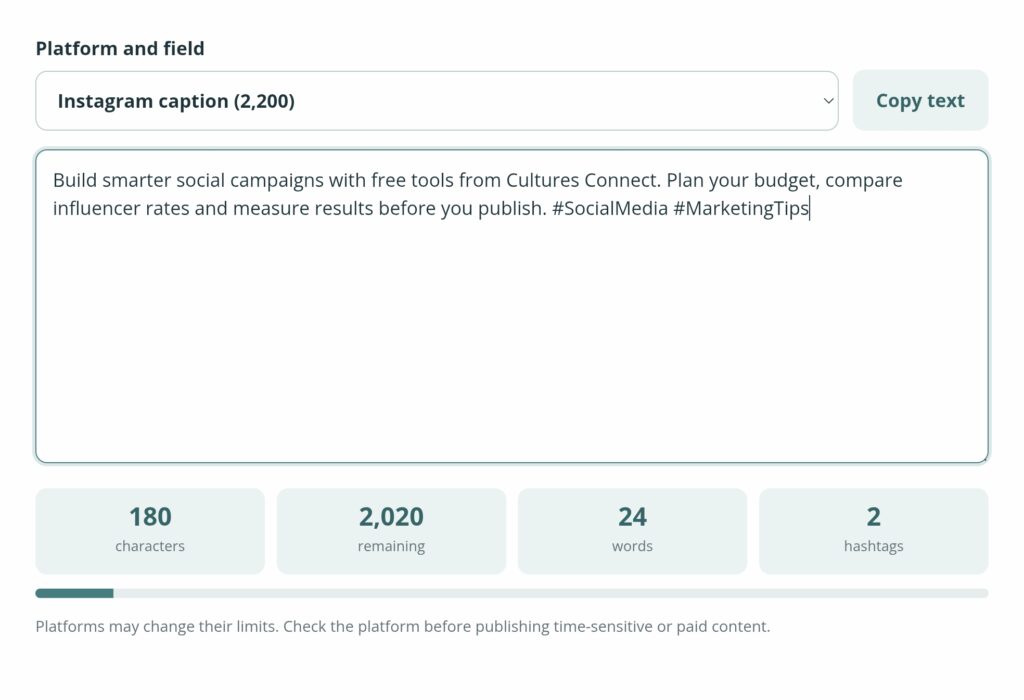
Paste this example into the calculator:
Build smarter social campaigns with free tools from Cultures Connect. Plan your budget, compare influencer rates and measure results before you publish. #SocialMedia #MarketingTips
For an Instagram caption, the tool should display:
- 180 characters
- 2,020 characters remaining
- 24 words
- 2 hashtags
Switch to X standard post and the same copy should display:
- 180 characters
- 100 characters remaining
- 24 words
- 2 hashtags
This shows how one message can fit within different platform limits while leaving different amounts of available space.
Character Limit Versus Recommended Length
The maximum limit tells you whether the platform will accept the text. It does not tell you whether people will read it.
The best length depends on:
- The platform
- The content format
- The complexity of the message
- The audience
- The campaign objective
- Where the text appears
- Whether the post is organic or paid
Use enough words to communicate the message clearly. Then remove repetition, vague introductions and unnecessary details.
How to Shorten Social Media Copy
If your draft exceeds the limit:
- Remove repeated ideas.
- Shorten the opening.
- Replace long phrases with simpler ones.
- Remove unnecessary adjectives.
- Use one clear call to action.
- Delete unrelated hashtags.
- Move extra details to the landing page.
- Turn several ideas into a post series or thread.
Do not remove information required for advertising disclosures or customer understanding simply to reduce the count.
Common Social Media Copy Mistakes
Hiding the Main Point
Do not spend the first paragraph preparing to explain the message. Lead with the information that gives people a reason to continue reading.
Using the Full Limit Unnecessarily
A post does not become more valuable because it uses every available character. Stop when the message is complete.
Copying the Same Caption Everywhere
Different platforms have different audiences, formats and search behaviour. Adapt the message instead of publishing an identical version everywhere.
Ignoring Truncation
A post may fit the official limit but still be shortened in the feed. Put the strongest information near the beginning.
Adding Too Many Hashtags
Hashtags should help describe or categorise the content. Do not add unrelated hashtags simply because space remains.
Forgetting the Landing Page
If the post includes a link, make sure its promise matches the destination. A strong caption cannot compensate for an irrelevant or unclear page.
Frequently Asked Questions
Does the counter include spaces?
Yes. Spaces, letters, punctuation, numbers and emojis are included in the character count.
Does the tool count hashtags?
Yes. It displays the number of hashtags separated as individual terms in the text.
Can I use the counter for Arabic copy?
Yes. You can paste Arabic or English text into the counter. Platform display and truncation may still vary by language and device.
Can I use it for emojis?
Yes. Emojis are included in the character count. Platforms and browsers may sometimes process complex emoji combinations differently.
Why does the platform show a different count?
Differences may be caused by links, line breaks, special characters, emoji combinations or platform-specific processing.
Does X always have a 280-character limit?
The standard post limit is 280 characters. Eligible X Premium subscribers may have access to longer posts.
Should I use all 800 Pinterest-description characters?
No. Use enough space to explain the Pin accurately and include relevant keywords naturally.
Does Cultures Connect store the text I enter?
No. The counter runs on your device. Cultures Connect does not store the copy you enter.
Plan and Measure Your Social Content
After preparing your copy, use the Social Media Campaign Budget Calculator to plan campaign spending.
Once the campaign is active, use the Marketing Metrics Calculator to calculate CPM, CPC, CTR, CPA, conversion rate and ROAS.
For practical Pinterest design guidance, read Editorial Pinterest Design: 7 Trends That Make Pins Stand Out. Check the final URL in WordPress before adding this link, because your published article’s slug may differ.
You can also explore all Cultures Connect marketing tools or download The Pop Culture → Brand Strategy Playbook.