
Social Media Campaign Budget Calculator
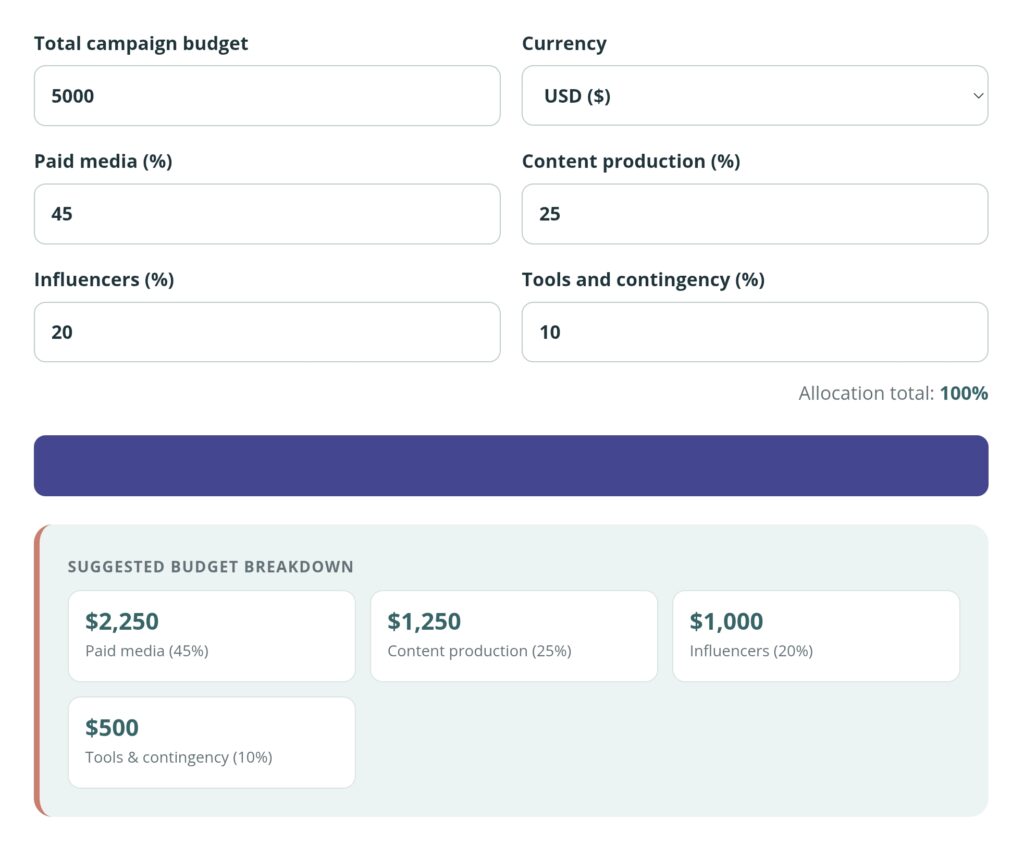
Use this free Social Media Campaign Budget Calculator to divide your campaign spending between paid media, content production, influencers, tools and contingency. Adjust the percentages to match your campaign objectives and available resources.
Enter your total budget, select your currency and make sure the four allocations add up to 100%. Your information stays on your device and is not stored by Cultures Connect.
How to Use the Social Media Campaign Budget Calculator
Follow these steps:
- Enter the total amount available for the campaign.
- Select the currency you will use.
- Enter the percentage allocated to paid media.
- Enter the percentage allocated to content production.
- Add the percentage for influencers.
- Add the percentage for tools and contingency.
- Make sure the allocation total equals 100%.
- Select Build budget breakdown.
The tool will show how much money is allocated to each category.
The default percentages provide a starting structure, not a universal recommendation. Adjust them according to the campaign’s objective, duration, audience, platforms and production needs.
What Should a Social Media Campaign Budget Include?
A social media campaign budget should include more than advertising spend. It may also need to cover creative work, creator partnerships, subscriptions, reporting and unexpected expenses.
The Social Media Campaign Budget Calculator divides the total budget into four broad categories:
- Paid media
- Content production
- Influencers
- Tools and contingency
You can use these categories to create an initial plan before developing a more detailed list of individual expenses.
Paid Media
Paid media is the amount used to promote content through advertising platforms such as Meta, TikTok, Pinterest, LinkedIn or Google.
It may cover:
- Campaign and ad-set budgets
- Retargeting
- Boosted posts
- Partnership ads
- Audience testing
- Creative testing
- Search or display advertising
A campaign focused on reach, traffic or conversions may allocate a larger percentage to paid distribution. However, putting most of the budget into advertising will not solve weak creative or an unclear offer.
Decide whether the advertising platform will use a daily or lifetime budget. Meta allows advertisers to apply budgets daily or across the lifetime of a campaign or ad set. You can review Meta’s official explanation of advertising budgets.
Content Production
Content production includes the work and resources needed to create campaign assets.
This category may cover:
- Strategy and creative concepts
- Copywriting
- Graphic design
- Photography
- Video production
- Editing
- Animation
- Props
- Locations
- Models
- Voice-over work
- Content resizing and adaptation
A campaign that requires several original videos may need a larger production allocation than one using existing brand assets.
Remember to budget for different formats and placements. One horizontal video may still need separate vertical, square and shortened versions for different platforms.
Influencers and Creators
This category covers payments made to influencers, content creators or their representatives.
It may include:
- Creator fees
- Content-production fees
- Usage rights
- Partnership-ad permissions
- Exclusivity
- Travel or location expenses
- Additional revisions
- Talent or management fees
Use the Influencer Rate Calculator to estimate a starting collaboration fee.
Before selecting a creator, use the Influencer Engagement Rate Calculator to compare audience interaction. Engagement is only one factor, so also review audience relevance, content quality, brand fit and previous partnerships.
Tools and Contingency
This category combines campaign software and a reserve for unexpected expenses.
Tools may include:
- Social media scheduling platforms
- Design subscriptions
- Video-editing software
- Stock images or music
- Analytics and reporting tools
- Landing-page software
- Link tracking
- Social listening
- Email platforms
Contingency is money kept aside for costs that were not fully expected when the campaign was planned. For example, the campaign may need an additional content variation, a replacement asset or extra paid support.
Avoid treating contingency as money that must be spent. Keep it available until it is genuinely needed.
Example Social Media Campaign Budget
Imagine that a brand has a total campaign budget of QAR 5,000.
Using the calculator’s default allocation:
| Category | Percentage | Amount |
|---|---|---|
| Paid media | 45% | QAR 2,250 |
| Content production | 25% | QAR 1,250 |
| Influencers | 20% | QAR 1,000 |
| Tools and contingency | 10% | QAR 500 |
| Total | 100% | QAR 5,000 |
This is only a starting example. The brand should adjust the percentages according to what the campaign requires.
A creator-led campaign may need more than 20% for influencers. A video campaign may require more than 25% for production. A campaign using existing content may be able to assign more money to paid distribution.
How to Adjust the Budget for Different Objectives
Brand-Awareness Campaign
An awareness campaign may place a larger percentage into paid media to reach more people. Content still needs to be strong enough to earn attention and communicate the brand clearly.
Sales or Lead-Generation Campaign
A conversion-focused campaign may need spending for paid media, landing-page improvements, tracking and creative testing.
Do not allocate the full budget before confirming that conversion tracking works correctly.
Product Launch
A launch may require more content production because the campaign needs product photography, demonstrations, launch videos, influencer content and multiple creative formats.
Influencer-Led Campaign
A creator-led campaign may allocate a larger percentage to influencer fees, content rights and paid partnership promotion.
Organic Social Media Campaign
An organic campaign may spend little or nothing on paid media. More of the budget can be assigned to content creation, community management and tools.
Daily Budget Versus Total Campaign Budget
The calculator begins with your total available campaign budget. You may still need to divide the paid-media allocation by the campaign duration.
For example, if QAR 2,250 is allocated to paid media over 30 days:
QAR 2,250 ÷ 30 = QAR 75 per day
This provides a simple daily average. Actual daily spending can fluctuate depending on the platform and settings.
Google explains that an average daily budget is the amount an advertiser is roughly comfortable spending each day over a month. In many Google Ads campaigns, daily spending can exceed that average on individual days while remaining subject to platform spending limits. Review Google Ads’ budget overview before setting the final advertising budget.
Common Campaign-Budget Mistakes
Spending Everything on Advertising
Advertising can distribute content, but it cannot replace a clear message, relevant offer or effective creative.
Forgetting Content Adaptations
A campaign may need different dimensions, durations, languages and captions for each platform. Include these adaptations in the production budget.
Leaving Out Influencer Usage Rights
A creator’s posting fee may not include permission to use their content in advertising or on other marketing channels.
Setting No Contingency
Unexpected expenses can force the campaign to reduce its advertising spend or cancel planned content. Keep a small reserve where possible.
Ignoring Taxes and Agency Fees
Confirm whether quotations include taxes, platform charges, agency fees and payment-processing costs.
Using the Full Company Budget
Do not enter money needed for regular business expenses. The total should represent the amount genuinely available for this campaign.
Changing the Budget Without Tracking Results
If you move money between categories, record the change and its reason. This will help you understand what worked when planning the next campaign.
Frequently Asked Questions
How much should I spend on a social media campaign?
There is no single correct amount. The budget depends on the objective, duration, audience, platforms, content requirements and expected results.
Do the percentages need to add up to 100%?
Yes. The calculator will not produce a breakdown unless the four percentages total exactly 100%.
Are the default percentages recommended for every campaign?
No. They provide a starting structure only. Adjust them to match the campaign.
Should influencer fees be included under content production?
Use the influencer category for creator fees and related creator costs. Use content production for assets created directly by the brand, agency or production team.
What should I include in contingency?
Contingency can cover unexpected revisions, replacement assets, additional ad support, last-minute production needs or other unplanned costs.
Can I use this calculator for an organic campaign?
Yes. Set paid media to 0% and redistribute that percentage among the other categories.
Can I use different currencies?
Yes. Select USD, GBP, EUR, QAR or AED. The calculator labels the results in your chosen currency but does not perform currency conversion.
Is the budget breakdown guaranteed to produce results?
No. It creates a planning structure. Campaign performance also depends on strategy, creative quality, targeting, the offer and execution.
Does Cultures Connect store my budget?
No. The calculation takes place on your device. Cultures Connect does not store the figures you enter.
Measure the Campaign After It Launches
Budget planning should continue after the campaign begins. Compare planned spending with actual spending and review which activities produced useful results.
Use the Marketing Metrics Calculator to calculate CPM, CPC, CTR, CPA, conversion rate and ROAS.
You can also read our guide to leveraging influencers for a successful campaign or explore lessons from buzzworthy award-show campaigns.
For more resources, visit the Cultures Connect marketing tools or explore The Pop Culture → Brand Strategy Playbook.