
Influencer Engagement Rate Calculator
Use this free Influencer Engagement Rate Calculator to measure how actively an audience interacts with a creator’s content. You can calculate engagement based on followers, reach or views and analyse either one post or several posts.
Enter the creator’s likes, comments, shares and saves to get an instant percentage. The information you enter stays on your device and is not stored by Cultures Connect.
How to Use the Influencer Engagement Rate Calculator
Follow these steps to calculate a creator’s engagement rate:
- Choose whether you want to calculate the rate using followers, reach or views.
- Enter the number of followers, people reached or video views.
- Add the total likes, comments, shares and saves.
- Enter the number of posts you are analysing. Use “1” if you are measuring a single post.
- Select Calculate engagement rate to see the result.
For a more reliable account-level estimate, analyse several recent posts instead of relying on one unusually successful or unsuccessful post. Use the same number of posts when comparing different creators.
What Is Influencer Engagement Rate?
Influencer engagement rate is the percentage of an audience that interacts with a creator’s content. These interactions can include likes, comments, shares and saves.
Follower count shows the potential size of a creator’s audience, but it does not show how interested that audience is. Engagement rate provides more context by comparing the number of interactions with the creator’s followers, content reach or views.
This makes the metric useful when shortlisting influencers for a campaign. A smaller creator with an active, relevant audience may be more valuable than a larger creator whose followers rarely interact with their content.
However, engagement rate should not be used alone. Audience relevance, content quality, location, demographics, previous partnerships and brand fit also matter.
Influencer Engagement Rate Formula
The calculator uses this formula:
Engagement rate = Average engagements per post ÷ Followers, reach or views × 100
Total engagements include:
Likes + comments + shares + saves
When you enter more than one post, the tool first calculates the average number of engagements per post. It then divides that average by the selected audience measure.
Example Engagement Rate Calculation
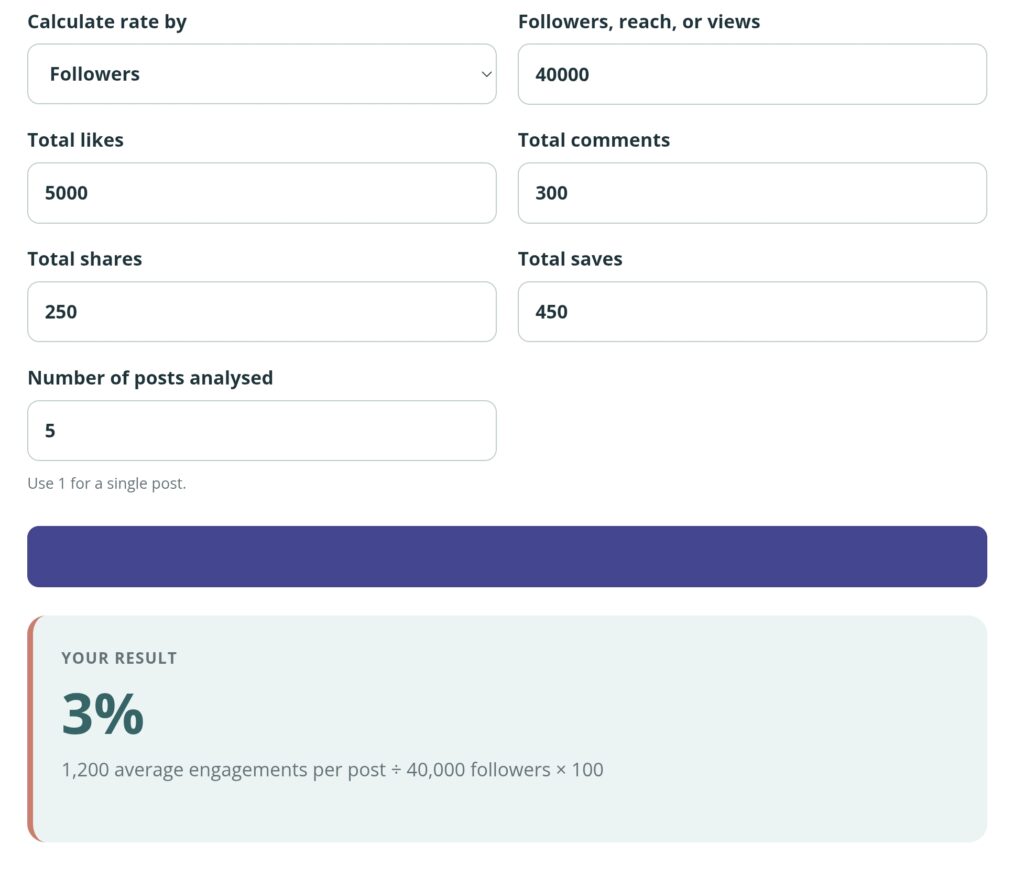
Imagine that an Instagram creator has 40,000 followers. Across five recent posts, the creator received:
- 5,000 likes
- 300 comments
- 250 shares
- 450 saves
The total number of engagements is 6,000.
Next, divide 6,000 by five posts. This produces an average of 1,200 engagements per post.
The calculation is:
1,200 ÷ 40,000 × 100 = 3%
The creator’s average engagement rate by followers is therefore 3%.
When comparing this result with another creator, use the same calculation method, number of posts and content type. Comparing one creator’s follower-based rate with another creator’s reach-based rate would not produce a fair comparison.
Followers, Reach or Views: Which Method Should You Use?
Engagement Rate by Followers
Use followers when you want a quick account-level comparison between creators with similar audience sizes.
This method is useful when you only have access to public information. However, not every follower will see every post, so it does not show how the people who actually viewed the content responded.
Engagement Rate by Reach
Use reach when you can access the number of unique accounts that saw the content. This is often more useful when reviewing completed campaign content or working directly with a creator who can share their analytics.
Meta defines Instagram reach as the number of unique accounts that saw a post or story at least once. You can read more in Meta’s explanation of Instagram reach.
Because reach is usually lower than total follower count, a reach-based engagement rate may be higher than a follower-based rate. Do not compare the two as if they use the same method.
Engagement Rate by Views
Use views for video-focused content on platforms such as TikTok, Instagram Reels or YouTube.
A view-based calculation shows how many interactions occurred compared with the number of views. Remember that platform definitions and counting methods can differ, and one person may sometimes generate more than one view.
What Is a Good Influencer Engagement Rate?
There is no single engagement rate that is considered good for every creator.
Rates can vary depending on:
- The social media platform
- The creator’s audience size
- The content format
- The creator’s niche
- How often the creator posts
- Whether the post was organic or sponsored
- The calculation method used
- The age of the posts being analysed
The most useful approach is to compare similar creators using the same method. For example, compare Instagram beauty creators with similar follower counts over the same number of recent posts.
You should also examine the quality of the interactions. Relevant comments, questions, shares and saves may indicate stronger audience interest than a large number of generic likes or repeated comments.
Common Engagement-Rate Mistakes
Analysing Only One Post
One viral post can make a creator’s usual performance look much stronger than it is. One poorly performing post can have the opposite effect. Analyse several recent posts when possible.
Comparing Different Calculation Methods
A follower-based result should not be compared directly with a reach-based or view-based result. Choose one method and use it consistently across all creators.
Ignoring the Quality of Comments
A high number of comments does not always mean the audience is genuinely interested. Look for relevant conversations, questions and thoughtful responses rather than only counting comments.
Comparing Different Content Formats
Reels, photographs, carousels and Stories can produce different interaction patterns. For the fairest comparison, analyse similar formats.
Treating Engagement as the Only Selection Metric
A strong percentage does not guarantee that a creator is right for your campaign. Check whether their audience, content style, values and location fit your brand.
Ignoring Sponsored-Content Disclosures
Engagement does not replace proper campaign disclosure. Influencers and brands should clearly identify material relationships, such as payment or free products. The FTC’s disclosure guidance for social media influencers explains these requirements for content that could affect US consumers.
How Brands Can Use Engagement Rate
Brands can use engagement rate during different stages of an influencer campaign.
Before a campaign, it can help compare creators and identify accounts with active audiences. During negotiations, it provides extra context alongside audience size, content requirements and usage rights. After publishing, it can help evaluate how strongly the sponsored content encouraged interaction.
Once you have shortlisted a creator, use the Influencer Rate Calculator to estimate a starting collaboration price.
You can also read our guide on how to leverage influencers for a successful campaign for help with creator selection, campaign briefs and performance measurement.
Frequently Asked Questions
Can I calculate engagement for more than one post?
Yes. Add the combined likes, comments, shares and saves from all the posts. Then enter the number of posts analysed. The calculator will determine the average number of engagements per post before calculating the rate.
How many posts should I analyse?
There is no required number, but several recent posts normally provide a more balanced picture than one post. Use the same number of posts for every creator you compare.
Should I include sponsored posts?
That depends on your goal. If you want to predict sponsored-content performance, analyse the creator’s recent sponsored posts separately. Mixing sponsored and organic posts may hide differences in how the audience responds.
Should I include shares and saves?
Include them when the platform provides the data. Shares and saves can indicate that people found the content useful, entertaining or worth revisiting. If these metrics are unavailable for every creator, exclude them consistently from all comparisons.
Why is the reach-based rate higher than the follower-based rate?
Reach counts the unique accounts that saw the content, while follower count includes people who may not have seen it. Because reach is often lower than follower count, dividing engagement by reach can produce a higher percentage.
Can I use this calculator for TikTok, Instagram and YouTube?
Yes. The calculator can be used with any platform that provides interaction, follower, reach or view data. Make sure you use the same method when comparing creators.
Does a high engagement rate guarantee campaign sales?
No. Engagement shows interaction, not guaranteed purchases. Sales also depend on audience relevance, the offer, the product, the creator’s credibility, the content and the call to action.
Does Cultures Connect store the information I enter?
No. The calculations take place on your device. The numbers you enter are not submitted to or stored by Cultures Connect.
Plan the Rest of Your Influencer Campaign
Engagement rate can help you identify promising creators, but a successful partnership also requires the right audience fit, content direction and campaign budget.
Use the Influencer Rate Calculator to estimate a starting creator fee, or try the Social Media Campaign Budget Calculator to divide your wider campaign budget.
For more guidance, explore the Cultures Connect marketing tools or download The Pop Culture → Brand Strategy Playbook.